- New From...
- Save to SmarTeam
- Lifecycle operations
- Copy
- Check out
- Check in
- New Release
- Release
- Open
- Refresh
The Progress Indicator presents the tasks that are being performed. A sample Progress Indicator for a Check In operation is shown below:
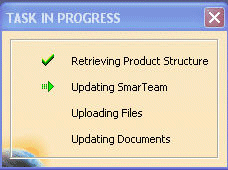
The following symbols appear in the Progress Indicator window:
 |
Represents a completed task. |
 |
Represents a task that is currently in progress. |
