

-
You are requested to upgrade your model to V5-6R2019 standards.
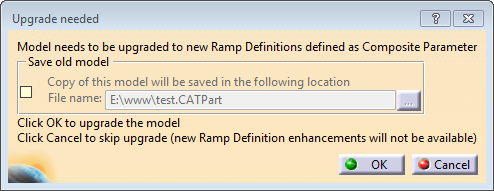
- When you open a part containing Composites Grid Design object in the Composites Design or Composites Grid Design workbench.
- When you need to edit or create any Composites Grid Design object.
If the part has not been migrated when entering the workbench, all existing Composites Grid Design objects are unchanged and commands working on physical plies are operational, but an upgrade is requested at creation or edition for all grid related objects.
This applies to the following commands:- Grid Panel
- Grid
- Virtual Stacking
- Plies From Virtual Stacking
- Manage Drop Off
- Grid Angle Cut
- Grid Angle Cut Wizard
- Import/Export Design.
There is a exception to this rule when editing Ramp Support, to let you change the parallel mode for ramp support curves, as multi-parallel mode is always recommended to compute parallel curves (legacy and migrated data).
-
According to your need:
Click Cancel to refuse the update (not recommended)
Click OK to accept the upgrade (recommended). -
If needed, select the check box in Save old model.
-
Click OK.
An Upgrade Report is displayed. Click Show all messages to see the details of the migration.- Ramp definitions are created for all staggerings on each reference element groups, reference element (Including sub-staggering) and ramp support.
- Generative Shape Design features such as parallel and offset-intersect are not upgraded (No geometry change).
- Empty ramp supports are not migrated.
- If there is only one custom ramp support for a given side and sub-staggering, the corresponding ramp definition becomes the reference for the reference element sub-staggering.
- Ramp supports with a staggering defined from the reference
element may have a specific ramp definition after upgrade:
- Either because the material thickness used by the slope defined by rate/angle was defined at the ramp support level, not at the reference element level.
- Or a specific smoothing was used at the ramp support level. Upgrade creates an overriding smoothing.
- Ramp supports with a ramp support curve as reference are no longer supported. The ramp support is changed to a custom ramp support, with corresponding curves stored under a dedicated open body before stacking.
- A Ramp Definitions node is created under Composites Parameters in the specification tree.
- A Ramp Definitions tab is added in the Composites Parameters dialog box.
