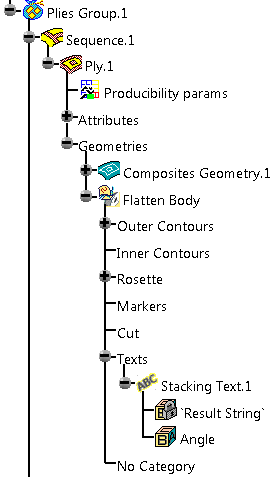
Open the ManufacturingData1.CATPart document.

-
Click Stacking Texts on Plies
 in the Manufacturing toolbar.
-
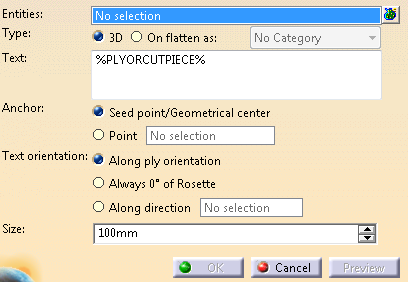
Select the parent of the stacking text.
It can be a stacking, a plies group, a sequence, a ply, a cut-piece or a flatten body.
Stacking text on Plies on unfold feature in not supported. -
Select 3D as the type of text.
Then select the type of Anchor: Seed point/Geometrical center or Point.
You have to select or create the point with the contextual menu. -
Alternatively, select On flatten as
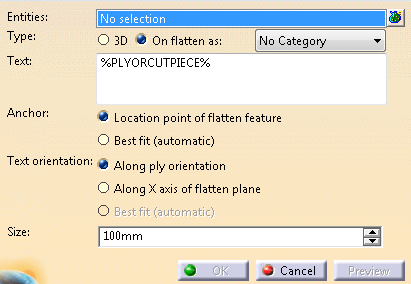
and choose a category from the list.
Possible choices are No Category, Markers or Texts.
Then select the type of Anchor: Location point of flatten feature or Best fit (automatic).
Best fit (automatic) is a one shot positioning. It is not updated if the ply shape or orientation are modified. -
Define the text.
Stacking Text on Plies supports all characters as well as the following key words.
In the resulting text, whenever possible, a keyword is replaced by the corresponding value.
Otherwise, it remains as is in the resulting text.
The interpretation of a keyword depends on its position on the stacking, as shown below.
- Stacking Plies Group Sequence Ply Cut-Piece %PARTFILENAME% Yes Yes Yes Yes Yes %PARTNUMBER% Yes Yes Yes Yes Yes %PLYGROUP% No Yes Yes Yes Yes %SEQUENCE% No No Yes Yes Yes %PLY% No No No Yes Yes %CUTPIECE% No No No No Yes %PLYORCUTPIECE% No No No Yes Yes %PLY_CUTPIECE% No No No Yes Yes/No %MATERIALNAME% Yes if only 1 material in Stacking Yes if only 1 material in Ply Group Yes if only 1 material in sequence Yes Yes %MATERIALID% Yes if only 1 material in Stacking Yes if only 1 material in Ply Group Yes if only 1 material in sequence Yes Yes %DIRECTIONNAME% Yes if only 1 direction in Stacking (unlikely) Yes if only 1 direction in Ply Group (unlikely) Yes if only 1 direction in sequence Yes Yes %DIRECTIONVALUE% Yes if only 1 direction in Stacking (unlikely) Yes if only 1 direction in Ply Group (unlikely) Yes if only 1 direction in sequence Yes Yes Define the orientation of the text.
- Along ply orientation
- Along X axis of flatten plane
- Best fit (automatic): The text is rotated to fit in the ply/cut-piece shape.
Define the Size of the font.
-
Click OK.
The stacking text is created under the chosen category
and depending on its type, under Stacking Text
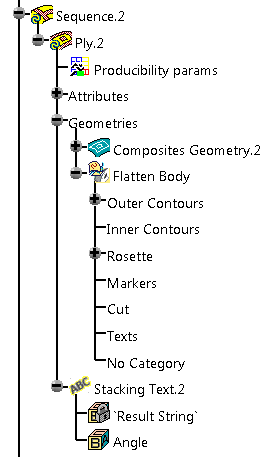
or under the Flatten Body