This section contains the following information about Sectioning in 3D only:
How to Modify the Section Cut Position by Specified Increments
|
|
This section contains the following information about Sectioning in 3D only: How to Modify the Section Cut Position by Specified Increments |
 About
Sectioning
About
Sectioning|
|
Sectioning provides you the option to create sections of a part and position that part to your specifications. Section cuts provide access to the internal features of a part. |
When
Sectioning|
|
When creating a section cut a grid is created using Normal Constraints with X, Y, Z axis for location. The grid can be:
The section cut can be:
|
How
to Create a Section Cut
 |
You can create section cuts of your documents. |
 |
|
How
to Modify the Section Cut Position by Specified Increments|
|
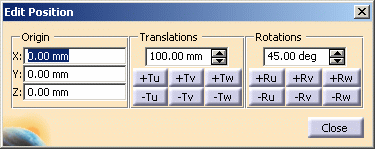
You can translate and/or rotate the section cut by
specified increments using the Edit Position dialog box. You can also
designate the section cut position explicitly by entering the x, y, and z
values. |
|
|
Modifying the section cut position by explicitly specifying coordinates
Translating the section cut position by increments
Rotating the section cut position by increments
Exiting the Edit Properties dialog box
|
|
|
When you load large models and are using the grid for visualization purposes, the interval between lines of the grid will be adjusted as necessary to fit the entire model in the viewing space. Therefore, the interval might not correspond to the interval specified in the Settings. (If you zoom in close enough that the specified interval can be used, the grid interval will automatically revert to the specified value.) |


 button.
 button. See
  button and select the three points anywhere on the loaded objects.
  button.
 button.
 button.