|
-
Click Scallop
 in the
Detailing Tools toolbar. in the
Detailing Tools toolbar.
| The
Scallop
dialog box appears. |
-
Select the element on which the scallops are to be
created.
You can select multiple elements.
 |
| |
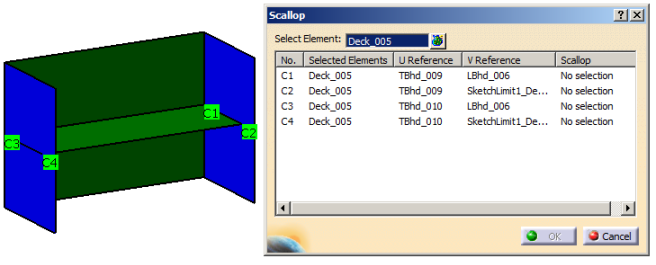
The valid corners at which the scallops can be created are
listed in the dialog box. The corners are highlighted in the 3D.
 |
- The computation of the corners is done
considering the limits applied to the plate. The
valid limits are:
- Plate
- Plane
- Surface
- Open sketch
profile.
If the plate
intersects with the valid limits, the corner
can be computed.
|
- If the plate is limited with a closed sketch or with a stiffener (either web or flange), the
corners cannot be computed.
|
|
-
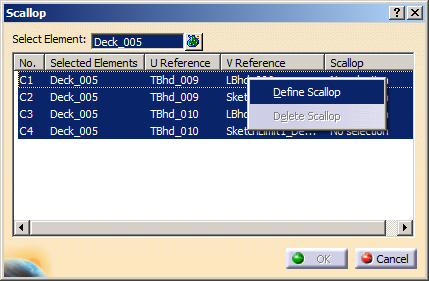
To create the scallop, select one or more rows, then right-click and select
Define Scallop.
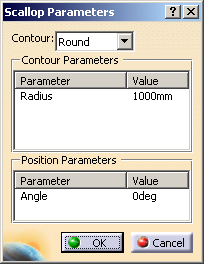
| The Scallop Parameters dialog box appears. |
 |
-
In the Scallop Parameters dialog box, define
the scallop contour and its parameters:
- In the Contour list, select one of
the following contour types:
- In the Contour Parameters area, the
parameter and the value of the contour are listed.
You can edit the value by double-clicking it.
- In the Position Parameters area, the
parameter and the value of the position orientation are listed.
You can edit the angle value by double-clicking it.
- Click OK to return to the
Scallop dialog box.
The defined scallop is listed in the
Scallop column.
|
-
Click OK in the Scallop dialog
box.
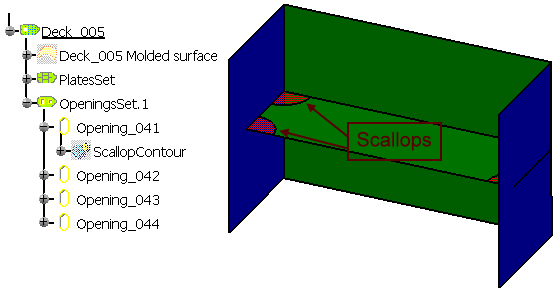
The scallops are created at the corners of the plate.
The element (identified as ScallopContour) is added to the
specification tree in the OpeningSets.x node under the
Opening sub-node.
|
|
- If the applied limit has offset from the plate, it is
impossible to compute the scallops for such corners.
- If the applied limits have offset from each other, it is
impossible to compute the scallops for such corners.
- You can visualize the scallop representation in the graphic
replacement of the plates in SideView and
AnyView. It will appear similar to the opening in the
drawing. For more information, refer to
Graphic
Replacement for Scallops.
|
|