About Advanced Copy

The Advanced Copy command enables you to copy or move one or more element (plates, stiffeners, beams, openings) along the reference planes.


Principle for Advanced Copy (in Translation mode)

Translation is the displacement of an element from one position to another position.

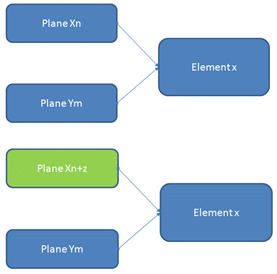
An element x has several inputs like Plane Xn (plane number n in the family X) and Plane Ym. If the plane Xn is translated by z planes, it is possible to change/replace the input of the element x to reflect the transformation and obtain the following:


Principle for Advanced Copy (in Symmetry mode)

Symmetry is an operation in which an element is transformed by means of mirror symmetry with respect to a reference plane. In the Symmetry mode, each input of an element x gets replaced by its symmetrical part.

For example, LONG.1 becomes LONG.-1, if the symmetry plane is the CenterLine plane.