
WorkshopDocuments_Style.xml defines style attributes for each of the following document types, all in a single XML file:
- plate sketches
- profile sketches
- template sketches
- girth table resource sketches
- pin jig resource sketches
- inverse bending curve data
- pin jig data
- girth table data
- profile data

- Note that any changes made in Project Resource Management and the various style files it points to require administrative access.
- To view the attributes defined in the sample WorkshopDocuments_Style.xml
file in the Standard Definition dialog box (via Tools > Standard...),
the SAMPLES folder provided must be moved directly under the following
folder in your V5 installation path:
..\intel_a\resources\standard\ - The path specified for DpmStrWorkshopDocumentsStyle must also be updated to reflect the new location of WorkshopDocuments_Style.xml.

Workshop document style example
The sample workshop document style XML file (WorkshopDocuments_Style.xml) can be divided into two general sections comprised of:
- A series of enumeration definitions that define valid values for attributes such as drawing scale, file format, orientation, and cutting contour color
- A series of nodes for the supported document types to define style attributes for each
Referring to the PlateFabSketch node as an example, entries are defined for OutputFormats, TemplateDrawingDoc, DrgScale and GO_DetailName.
<std:node name="PlateFabSketch">


		<std:node name="OutputFormats">


        <std:enumval name="Formats">CATDrawing</std:enumval>

    </std:node>


		<std:node name="TemplateDrawingDoc">


		<std:strval>TemplateDrw_Plate.CATDrawing</std:strval>


		</std:node>


		<std:node name="Scale">


		<std:enumval name="DrgScale">Fit to paper</std:enumval>


		</std:node>


		<std:node name="GO_DetailName">


		<std:enumval name="GO_Details">Orient_15x15</std:enumval>

		</std:node>
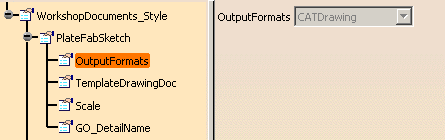
Entries defined within the PlateFabSketch node are displayed as sub-nodes in the left frame of the Standard Definition viewer with their corresponding value in the right frame in the following manner:
OutputFormats
		<std:node name="OutputFormats">


		<std:enumval name="Formats">CATDrawing</std:enumval>


		</std:node>
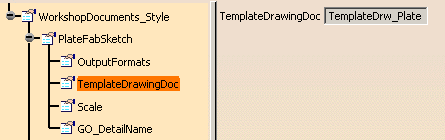
TemplateDrawingDoc
		<std:node name="TemplateDrawingDoc">


		<std:strval>TemplateDrw_Plate.CATDrawing</std:strval>


		</std:node>
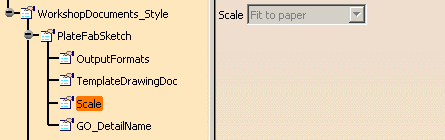
Scale
		<std:node name="Scale">


		<std:enumval name="DrgScale">Fit to paper</std:enumval>


		</std:node>
GO_DetailName
		<std:node name="GO_DetailName">


		<std:enumval name="GO_Details">Orient_15x15</std:enumval>


</std:node> 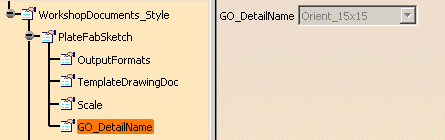
Entries for the remaining document types (TemplateFabSketch, ProfileFabSketch, etc.) are displayed in the Standard Definition viewer in the same manner as shown above.
