 |
This procedure explains how to generate a
report for all the IPM plates corresponding to selected Assemble
MacroActivities. The report contains information about important
attributes of IPM plates such as Name, Part Number, Weight, Plate
Length, Plate Width, and status. |
 |
-
Add plate attributes to the PRM XML file. The attributes
are column headings in the generated report.
| Location of the file: \intel_a\reffiles\disciplines\DPMStructure.xml
In this file,
-
Search for the STRPlate
Attributes heading
-
Add the plate attributes in the
Location attribute of the
JobOrderReport node.
-
Separate each attribute by a
semi-colon (;) delimiter. Please note that
Name attribute will be provided as the
first attribute by default. You cannot remove
that attribute, but you can add or remove other
attributes
|
-
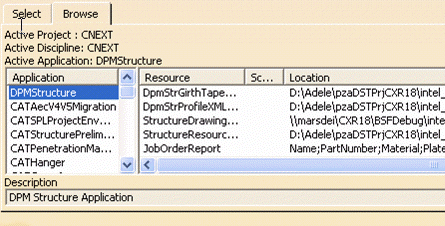
Select Tools > Project Management > Select/Browse.
| Verify that for the DPMStructure Application in the
Project Resource Management, these attributes are coming
properly in the Location column for WorkOrderReport
Resource Type |
 |
-
Click Generate a Job Order
 . .
The Tools Palette appears.
-
Use the Tools Palette to select the AssembleMacro
Activities from the PPR tree for which you wish to generate the report.
| Based on the entries made for attributes in the PRM,
a detailed report is generated. |
 |
-
Click the Save As button to save the report.
|
The file will be saved in
text (Tab delimited) (*.txt) format. ALMA uses this
format while using this report.
In the case of product
update scenario, if one plate is added, one is deleted
and one is modified, the generated report shows the
alterations in the Update Status field. |
|

