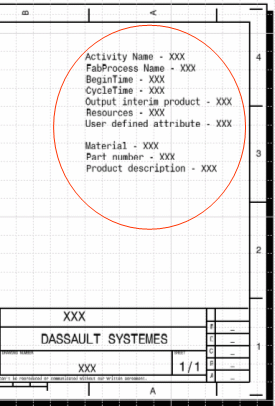
You can extract values of all the attributes defined in the template drawing. These attributes are user-defined. Labels for different type of marking line (for example, roll line and sight lines) are also extracted. Labels are displayed near marking lines.
Make sure that entries in the PRM file and Workshop Document style xml file are correct:
Refer to the Managing Project Resources for more information.
It is possible to see different attributes related to the generated
sketches. For example, identification of roll lines, template sight lines as
well as various attributes related to activities and the designed piece part.
These attributes include:
The administrator creates a template drawing mentioning all the attributes
required in the sketch. The template file storage location is declared in the
PRM file and the file name should be put in the WD style xml file, to ensure
that the software picks the correct template.
This is how a resource in PRM for workshop document style file is declared:
<Resource Name="DpmStrFabSketchPlateStyle" Description="Plate fab
 sketch style xml file">

 <IDType="Path"Driver="File" Location="resources\standard\generativeparameters\FabSketchDocument_PlateStyle.xml"/>

 </Resource>
Here is an example of template drawing showing a few attribute names like Activity Name, Material, and so on.
The attribute values will be solved at run time when the sketch is
generated.
The administrator/setup person must set the desired attributes in the Template
drawing. The names of these attributes must be added in the template drawing.
The software will valuate these attributes, and show these values in the final
sketch.
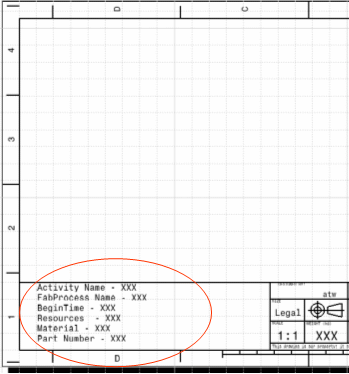
The setup person (who created the template drawing) can put these attributes text in a background view as well and the software will solve these attribute texts at run time when the sketch is generated.
Here is example of such a drawing template:
Some manufacturing features representations involve texts. For example, Roll Line and Sight line labels are needed in the sketch for flattened curved plates.
Extracted texts are placed in the middle of the corresponding marking line by default.
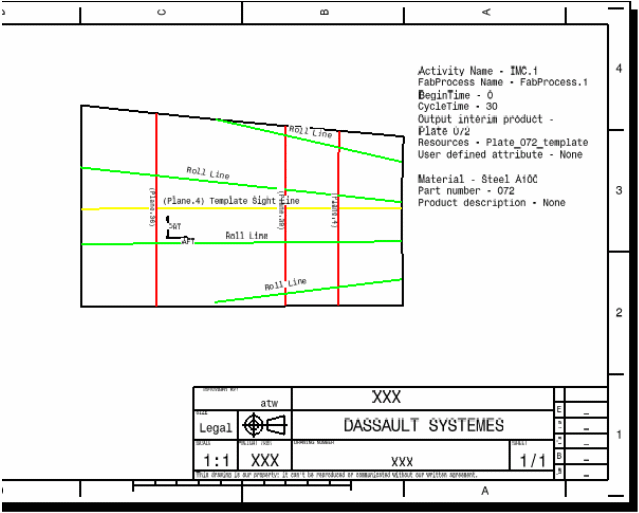
Attributes defined in Process Engineer cannot be extracted, and therefore are not be seen in the attributes block of workshop documents.