
This procedure describes how to choose an activity and hide all the items (products and other items, including manufacturing assembly) and resources in the 3D viewer except those that are assigned to the activity and its children activities. This command shows the input items assigned; not the output items.
You can also select a resource or a TSA. For a resourcem all the behaviors and TSAs of the resource or any of its children are taken into account. As a consequence, all the products, resources or manufacturing assemblies assigned to any behavior or TSA under the selected resource is shown, while others are hidden. The resources under the selected resource remain visible regardless of whether they are assigned to a behavior or TSA or whether they are not assigned.

The user can save a state of visualized items (products and other items including manufacturing assembly) and resources. The user can also always restore the view.
-
Select an activity, resource behavior, or TSA.
You can use the Shift key to select more than one item. -
Click Show Selected Activity's Items
 .
.
Click the button you want. The table below provides the options.
Button Value Save The current state of hiding or showing for the unassigned items is maintained, and the dialog box exits. Restore The previously saved state of visibility returns. If there is no previously saved state of visibility, Restore is not available.
The command only works on one process document at a time to work with other process documents, restore those documents activities using Restore.Apply The items and resource of the activity tree are visible while all the rest are hidden. Once you select an activity, the items and resources of the activity (and its tree) are highlighted. The visibility is applied only when you click Apply. OK The dialog box exits with all changes maintained. Cancel The dialog box exits with no changes maintained.
| The items and resources assigned to that activity and the manufacturing assemblies associated to the activity and its children activities are highlighted. The Show Object's Items dialog box appears. |
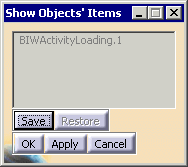 |
| The Save button retains the current state of visibility.
The Restore button restores the previously saved state of visibility. The Apply button makes the items and resources of the activity tree visible while all the rest are hidden. Once you select an activity, the items and resources of the activity (and its tree) are highlighted. The visibility will be applied only when Apply button is pressed. |
| This command works for only one process document at a time. To work with other process documents, restore all activities using the Restore button. |
| If there is not any activity used by this command, Restore button is not be available for selection. |
