Cross Highlighting during Process Verification

If this check box is selected, cross highlighting occurs for objects that have been linked to processes by means of relations. The objects affected by the cross highlight are highlighted and every process is separately displayed step-by-step in both the PPR tree and 3D graphic views. All other views of the process, e.g., the MBOM Viewer, the PERT chart or the Gantt chart, do not show cross highlights during a process verification session.
 

Cross Highlight Functions

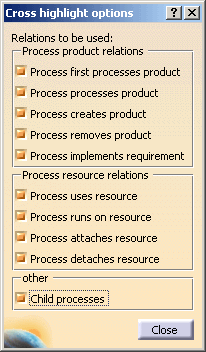
Cross highlighting for objects with a specific relation that is linked with a process can be executed if the following conditions are met:

  • The object is linked to the selected process.
  • Cross highlighting is activated in the Process Verification dialog box.
  • The specific relation is selected in the Cross highlight options dialog box.

Within cross highlighting in Process Verification a possibility is given to highlight products, resources and Manufacturing Assemblies/Manufacturing Kits to assign to children of the current process in Process Verification - and not only products, resources and Manufacturing Assemblies/Manufacturing Kits assigned to the current process itself.

  • When the option Child processes is selected, cross highlighting is performed for all checked relation types and for all children of the current process.

  • When the option Child processes is not selected, children of the current process are NOT considered for cross highlighting - it is the same behavior of this command in previous releases.

ascenari.gif (1364 bytes) The Cross highlight options dialog box appears when you click the Cross highlight options button on the Process Verification dialog box; this button is only available once you select the Cross highlight check box on the Process Verification dialog box.  The Cross highlight options dialog box can remain open and can be modified throughout your process verification session.

If the option "Support Engineering Requirements" in Tools > Options > Digital Process for Manufacturing > Verification is turned off, then the relation "Process implements requirement" is not available because then this relation is not supported in Process Verification.

  When a product is assigned with Process removes product, the product is set to "hide" status, and it is therefore not visible in the 3D geometry. During cross highlight, the product is cross highlighted in the PPR tree but it is not made visible for cross highlighting purposes in the 3D view.

During cross highlight, only the objects that are directly linked to a process are displayed. Objects that have been displayed in a previous process are no longer displayed. Every process is displayed individually, for instance, step-by-step production of a product subassembly in a set process chain.

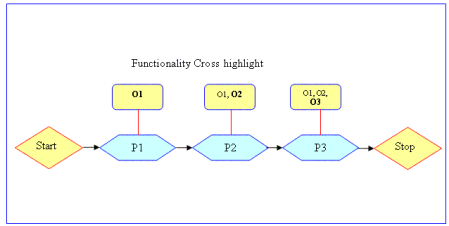
The diagram below illustrates the principal functions of cross highlighting during process verification. In the following examples there are three objects: O1, O2, and O3. Each object is linked to a single process, P1, P2, and P3, respectively.  During cross highlighting, the following occurs:

  • In process P1, only the object O1 is highlighted.
  • In process P2, only object O2 is highlighted. Because object O1 is already present in the process chain, it is not highlighted during the cross highlighting of process P2.
  • In process P3, only object O3 is highlighted. Because objects O1 and O2 are already present in the process chain, they are not highlighted during the cross highlighting of process P3.

ascenari.gif (1364 bytes)

Objects that are marked with color because of cross highlighting are colored not only below the current object, but also in all other places inside of the tree and in the graphic.

  If you do not select any options in the Cross highlight options dialog box, process verification proceeds as if cross highlighting were not enabled.