Displaying Engineering Requirements in Process Verification

Licensing

An engineering requirement includes instructions or alerts for the manufacturing engineer's process that have been created by the design engineer. In V5, these requirements can be assigned or implemented using the Engineering Requirements Planner product (specific license required).  Once engineering requirements have been assigned, they can be viewed in a process verification session without an Engineering Requirements Planner product license.

In order to display engineering requirements in a 3D graphic, they are created and saved as Feature Tolerance & Annotation (FTA) objects. An FTA object is contained in a CATProduct or CATPart file created in V5. These FTA objects are displayed in the 3D graphic display.

To display an engineering requirement during the process verification, it must be linked to a process with the relation Process Implements Requirement.

Engineering requirements are displayed only for the process to which this relation exists; after process verification progresses to a process other than the one for which there is a relation, the engineering requirements are no longer visible.

ascenari.gif (1364 bytes)

Display Engineering Requirements

  The procedure below assumes that you have created a process called Workplan, which has three sub-processes:
  • ACT1 (linked to engineering requirement ER1 with the relation Process Implements Requirement)
  • ACT2
  • ACT3 (linked to engineering requirement ER3, with the relation Process Implements Requirement)
 
  1. On the PPR tree, select Workplan, and click Process Verification .

  2. On the Process Verification dialog box, step through Workplan, step by step.

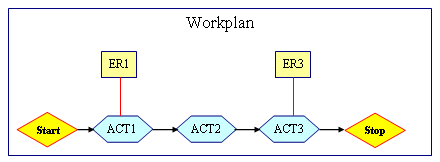
    The diagram below provides a schematic illustration of what occurs:
    • Start = no display
    • ACT1 = The instruction contained in the ER1 is displayed as a graphic FTA object.
    • ACT2 = no display
    • ACT3 = The instruction contained in ER3 is displayed as a graphic FTA object.
    Example

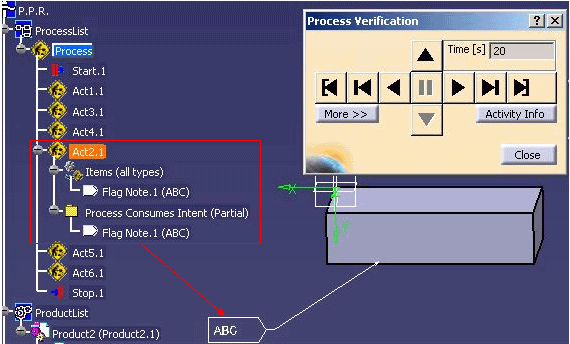
    In the image below, the engineering requirement has the content ABC, and is assigned to process Act2.1.  It is displayed when the process has been reached; it has been linked to the process via the relation Process Implements Requirement. When it steps to next process (Act5.1) this ER is not displayed anymore.

aendtask.gif (1477 bytes)