
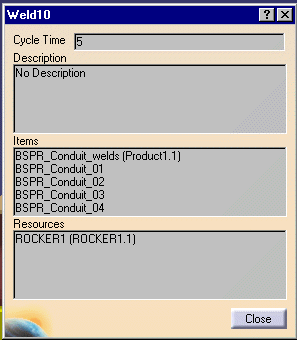
The title of each information panel corresponds to the name of the activity in the process about which you are getting information.
The table below explains what each field represents.
|
Cycle time |
This shows the time, in seconds, that it takes to perform the activity. |
|
Description |
The description that may appear in the box is the one associated with the activity in the activities or operations library. See DPM Process and Resource Definition User's Guide: Basic Tasks: Creating a Process Library: Setting the Associated Operator for an Activity for information on how to enter text that appears in this panel. |
|
Items |
This field lists an items, such as welds, appearing on the product. |
|
Resources |
This field shows the resources used for this step. |