

Exporting Analysis Information
-
After running a simulation, click Export in the [Analysis Information] dialog box.
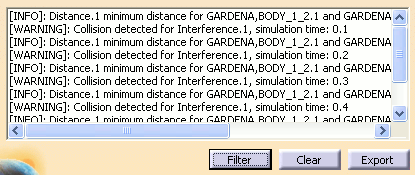
-
The Save As dialog box is displayed.
Select the location, filename and file format (*.txt, *.xls) to save the file to.
The following information is exported to the external
file:
- Simulation Time: expressed in current Time units set in Tools > Options > General > Parameters and Measure > Units;
- Analysis Object: name of analysis object;
- Part 1: applicable only for Distance objects – represents the name of first product part of the pair detected as having the minimum distance (based on computation type);
- Part 2: applicable only for Distance objects – represents the name of second product part of the pair detected as having the minimum distance (based on computation type);
- Value: applicable only for Distance objects – represents the minimum distance (based on computation type). This value is expressed in current Length units set in Tools->Options->General->Parameters and Measure->Units;
- Activity Name: applicable only for locally bound analysis objects – represents the name of activity binding the analysis object;
- Travel Distance: applicable only for analysis objects locally bound to Assembly Move activities – represents the distance traveled along the track. This value is expressed in current Length units set in Tools > Options > General > Parameters and Measure > Units;
- Analysis Type: represents the type of computation used by the analysis object. Interference objects can be of type: Contact + Clash, Clearance + Contact + Clash, Authorized Penetration, or Clash Rule. Distance objects can be of type: Minimum, Along X, Along Y, Along Z, or Band analysis;
- Analysis Mode: represents the selection mode used for analysis object. For Interference objects, this value can be: Inside one selection, Selection against all, Between all components, or Between two selections. For Distance objects, this value can be: Between two selections, Inside one selection, or Selection against all;
- Selection List 1: represents the first list of products selected by the user while defining the analysis objects. This list can be empty for Interference objects only, if Between all components analysis mode was selected;
- Selection List 2: represents the second list of products selected by the user while defining the analysis objects. This list will only be populated for analysis objects having Between two selections analysis mode set.
Notes
- If more objects belong to the selection lists, their names will be separated by a semicolon (;) character.
- Product names displayed in the Part 1, Part 2, Selection List 1, and Selection List 2 columns will indicate the full name of the product: the name of the product, then the name of its parent, etc., separated by the forward slash (/) character.
Exporting messages from a device/robot window
-
After running a simulation, click Export in the Device/Robot Output Window dialog box.
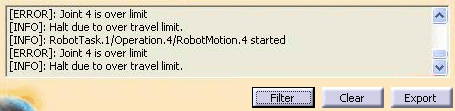
-
The Save As dialog box is displayed.
Select the location, filename and file format (*.txt, *.xls) to save the file to.
The following information is exported to the external file:
- Simulation Time: expressed in current Time units set in Tools > Options > General > Parameters and Measure > Units;
- Device Name: name of device/robot corresponding to the displayed message;
- Message: the message displayed.
Exporting multiple messages
Messages corresponding to multiple robots used in a simulation and the analysis results can be exported at once, without having to access each individual window and press the Export button.
-
Select Message Window Manager
 .
.
-
Click Export All in the Message Window Manager dialog box.
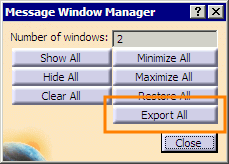
-
The Save As dialog box is displayed.
Select the location, filename and file format (*.txt, *.xls) to save the file to.
The following information will be exported to the external file:
- Simulation Time: expressed in current Time units set in Tools > Options > General > Parameters and Measure > Units;
- Object Name: the name of analysis object or device/robot corresponding to the displayed message;
- Message: the message displayed;
- Part 1: applicable only for Distance objects – represents the name of first product part of the pair detected as having the minimum distance (based on computation type);
- Part 2: applicable only for Distance objects – represents the name of second product part of the pair detected as having the minimum distance (based on computation type);
- Value: applicable only for Distance objects – represents the minimum distance (based on computation type). This value is expressed in current Length units set in Tools > Options > General > Parameters and Measure > Units;
- Activity Name: applicable only for locally bound analysis objects – represents the name of activity binding the analysis object;
- Travel Distance: applicable only for analysis objects locally bound to Assembly Move activities – represents the distance travelled along the track. This value is expressed in current Length units set in Tools > Options > General > Parameters and Measure > Units;
- Analysis Type: represents the type of computation used by the analysis object. Interference objects can be of type: Contact + Clash, Clearance + Contact + Clash, Authorized Penetration, or Clash Rule. Distance objects can be of type: Minimum, Along X, Along Y, Along Z, or Band analysis;
- Analysis Mode: represents the selection mode used for analysis object. For Interference objects, this value can be: Inside one selection, Selection against all, Between all components, or Between two selections. For Distance objects, this value can be: Between two selections, Inside one selection, or Selection against all;
- Selection List 1: represents the first list of products selected by the user while defining the analysis objects. This list can be empty for Interference objects only, if Between all components analysis mode was selected;
- Selection List 2: represents the second list of products selected by the user while defining the analysis objects. This list will only be populated for analysis objects having Between two selections analysis mode set.
Notes
- If more objects belong to the selection lists, their names will be separated by a semicolon (;) character.
- Product names displayed in the Part 1, Part 2, Selection List 1, and Selection List 2 columns will indicate the full name of the product: the name of the product, then the name of its parent, etc., separated by the forward slash (/) character.
Limitations
- Messages are not sorted based on simulation time. They are exported in the same order that they are displayed in the message window.
- When exporting messages from all windows at once, messages will not be sorted based on simulation time. They will be exported successively window-by-window (all messages displayed on one window are exported, then those from another window, and so on). Message windows are parsed in no particular order.
- The value set for Filter in a message window has no impact on the exported messages. All messages existing in a message window are exported to the external file.
- When exporting analysis results and/or device/robot messages, the supported file formats are *.txt and *.xls (note that only *.txt is supported on UNIX).
