 |
This procedure describes how to add a new
simulation activity to a process. This procedure applies to all
simulation activities, and shows how to determine the activity's location
in the process at the time you add it. |
 |
The dialog box in this procedure appears by
default. If you do not want this dialog box to appear, see Tools
> Options > DELMIA Infrastructure > Settings. |
 |
-
Select the command for the simulation activity you want
to create (e.g., a viewpoint activity).
-
Select the activity that you want the new activity to
appear before, after, or as the child of.
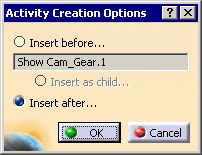
| The Activity Creation Options dialog box
appears: |
 |
 |
The default value that appears on the Activity Creation
Options dialog box depends on the type of the selected
(reference) activity:
- If the reference activity is a simulation activity (that
cannot have child activities), the Create as child
option is disabled and the default value is Insert after.
- If the reference activity is the root process, the new
activity is automatically inserted as a child, without displaying
the Activity Creation Options dialog box.
- If the reference activity is a non-simulation activity (that
can have child activities), the Insert as child option
is the default option.
|
-
Select the option you prefer, then click OK.
|
|
|
Once this step is complete, the dialog
boxes or other selections required for the specific simulation activity
appear. |
