Displaying and editing parameters in specification tree capability improves the productivity while modifying an input value for a part design feature. Part design features such as Dress-Up features and Advanced Dress-Up features have their parameters displayed under their respective nodes in the specification tree. It is very convenient to edit their value directly without using the dialog box of the feature. It also helps to check which parameters are bound by the knowledge and verify quickly the parameter value.
Displaying Parameters in Specification Tree
When an edge fillet is created on a part by selecting the Conic parameter option, following two parameters are displayed in the specification tree under EdgeFillet.X node.
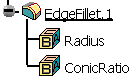 |
For more information about the Edge Fillet feature, see Creating Edge Fillets in the Part Design User's Guide.
Editing Parameters in Specification Tree
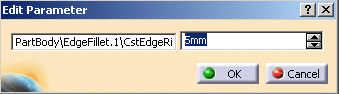
To change the value of the parameter, double click the parameter in the specification tree. The Edit Parameter dialog box is displayed. Enter the value or use the spinners to modify the value. The new parameter value is automatically updated and the object is modified accordingly.
 |
Following parameters are displayed in the specification tree for the mentioned features.
|
