
|
When you create a thread or a tap, its main diameter (hole diameter) is used as a
reference for computing thread standards. This behavior can be managed by
means of two modes: main diameter and thread diameter. |
 |
You must have the administrator rights to access and modify the thread
standards. |
 |
You can select the required mode by navigating to Tools > Options >
Mechanical Design > Part Design tab, Thread/ Tap area
and selecting or clearing the Main diameter used as reference for
standard management check box. |
|
|
By default, the Main diameter used as reference for standard
management check box is selected and the main diameter mode is
enabled. In this mode, following behavior is applicable:
- If a standard already exists on a thread or a hole, and
if you load a new standard, the search is performed keeping
the previous value of the thread.
- If a standard doesn't exists on a thread or a hole, and
if you load a new standard, the first value is initialized
according to the main diameter of the hole.
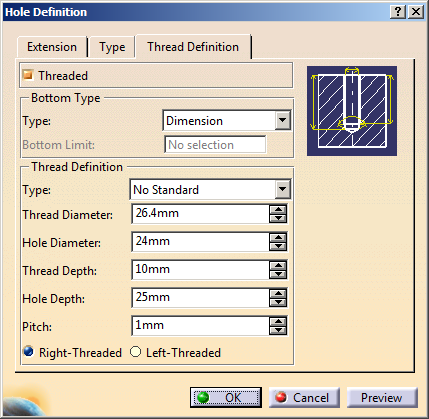
- In the Hole Definition dialog box, under the
Thread Definition tab, when you
select Threaded check box:
- Hole diameter is kept.
- Thread diameter = Hole diameter + 10%.
 |
This is applicable only if the Hole
Standard is set to No Standard
in the Type tab. |
|
|
|
|
|
|
|
When you clear the Main diameter used as reference for standard
management check box, the Mode_Thread_Diameter is enabled. In this
mode, following behavior is applicable:
- If a standard already exists on a thread or a hole,
current behavior is kept.
- If a standard doesn't exist on a thread or a hole, and
if you load a new standard, the first value is initialized
according to the thread diameter.
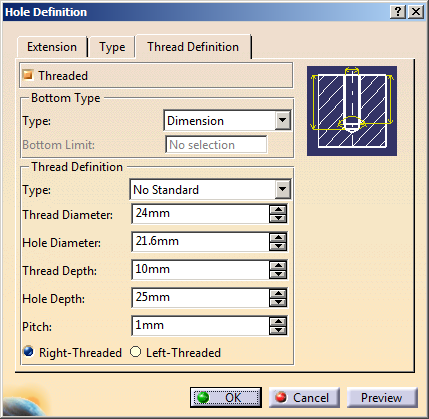
- In the Hole Definition dialog box, when you
select Threaded check box:
- Thread diameter = Hole diameter
- Hole diameter = Hole diameter - 10%.
|
|
This is applicable only if the Hole
Standard is set to No Standard
in the Type tab. |
|
|
|
|
|
