
Process and Resource Definition features a tool for checking the validity of a process model. A number of prerequisite conditions can be used to determine whether or not a model is valid. This tool analyzes the model to ensure that a number of modeling requirements are satisfied, and provides feedback to the user to indicate any requirements that are not met.
The model checker can be used to guard against unexpected behaviors when running process verification and process simulation.


Running the Model Checker
1.
Click the Examine Process Model icon
 in
the PPR Tools toolbar to launch the model checker.
in
the PPR Tools toolbar to launch the model checker.
2.
Select an activity from the PPR tree. The selected activity will represent the root process for examining its process model.
3.

The model checker function will begin validating the process model of selected activity against the fundamental V5 modeling requirements and rules.
If there are no errors found after analyzing the selected process model, the message "Process Model is Valid" will appear in the dialog box:

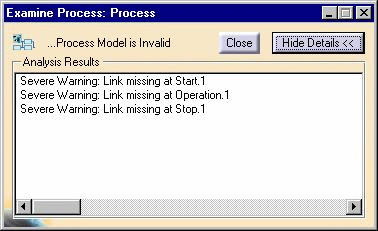
If errors are found, the message "Process Model is Invalid" will appear:

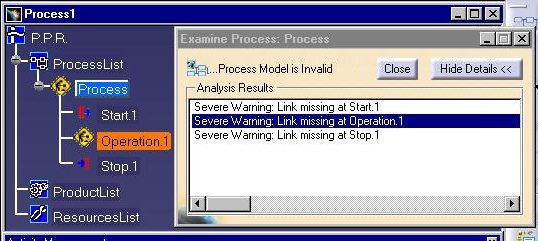
Any of the warning messages displayed in the list box can be selected in order to highlight the corresponding activity in the PPR tree, PERT viewer, or Gantt viewer, as shown in the following example:
How a process model is validated
The rules that the model checker will attempt to validate the selected process model
against are generally categorized as:
- Sequence Rules
- Hierarchical rules of Simulation & Planning activities
- Item Management Rules
Sequence Rules
Sequence rules focus on evaluating the given process model against the fundamental sequential linking requirements. The typical rules that fall into this category are:
-
Linking of Activities
This rule checks for valid links between activities. It's possible that a user may have forgotten to link some activities during modeling, and the PERT chart is the only tool that can be used to visually see whether all the links are correct. Because of this, it can be cumbersome for the user to check the links for all the activities in the process.
Improper links will also cause Process Verification to behave in-appropriately and can also affect the calculation of the output results from an activity. Hence this rule checks for these conditions and gives out appropriate messages to the user.
-
Cyclic Links
This rule determines whether any activity in the given process model is cyclically-linked. (For example, activity A is sequentially linked to activity B, and activity B is also sequentially linked back to activity A.) Although V5 doesn't allow this kind of link, it is commonly found in Process Engineer processes. This condition is not allowed, as it will result in unpredictable behavior while running process verification. Currently, this rule checks only for the existance of a cyclic link between any two adjacent activities.
Hierarchical rules for Simulation & Planning activity Structure
This rule category evaluates conditions pertaining to recommended hierarchical
structure for planning and simulation activities.
-
Co-existence of Activities
This rule checks for the co-existence of planning and assembly activities in the same level of the process model hierarchy. It is not recommended to mix assembly operations and planning activities in the same level. Although no such constraint is enforced during model creation, it is recommended to avoid this condition.
Item Management Rules
This rule category validates the process model against the recommended practices in
item management of simulation activities.
-
Simulation Activity Item Management
Assembly activities (like the Move activity) work on the items associated with those activities. These items should be among those items that are associated with the parent planning activity. This rule checks for this condition.

Notes
- The model checker only checks for the validity of the model and displays proper messages if inconsistencies are found. It does not correct the model.
- The model checker is a handy tool for a user to confirm that modeling is has been performed as recommended.
-
Process verification may not provide expected results if the model is not clean, therefore it is recommended to run this command before running process verification/simulation.
