
This section describes the Native Robot Language (NRL) Teach support for Nachi AW and AX controllers.
For each controller, it is necessary to create a CCF config file to display controller-specific robot commands, and to create a dressup downloader to output necessary information, in addition to the portion shown in NRL Teach.
For Nachi AW and AX robots (controller type), NRL Teach will display controller-specific command buttons, and script corresponding statements. Users can use the command buttons to script statements, such as motion commands to jog a robot and record motion instructions.


-
Click Native Robot Language Teach
 ,
and select a robot task from the PPR tree,
to open the NRL Teach dialog box.
,
and select a robot task from the PPR tree,
to open the NRL Teach dialog box. 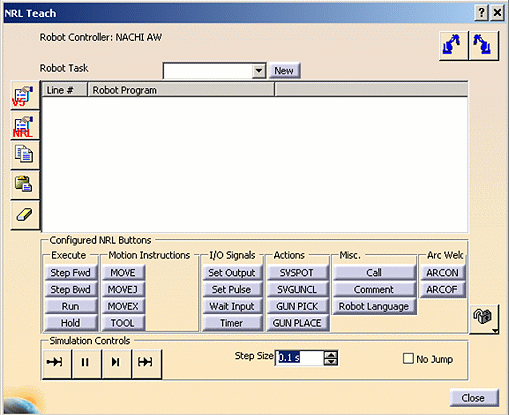
-
Select a motion instruction command (MOVE, MOVEJ, or MOVEX), Jog the robot and Record positions.
-
Click Play All to simulate the selected task.
-
Click Download Robot Program
 ,
in NRL Teach dialog box. The download operation will output AW and AX program files. For
example,
,
in NRL Teach dialog box. The download operation will output AW and AX program files. For
example,
1 MOVEX A=1P, M1X, P, (1769.99656,-593.02338, 2079.99416,-179.99985,-64.26431,-0.00014), CONF=000, S=2500, H=1
2 END -
Click Upload Robot Program
 ,
to upload the robot program stored in the previous step.
,
to upload the robot program stored in the previous step. -
Click Play All to simulate the selected task.
