
This section describes the Native Robot Language (NRL) Teach support for Kuka KRC controller.
For each controller, it is necessary to create a CCF config file to display controller-specific robot commands, and to create a dressup downloader to output necessary information, in addition to the portion shown in NRL Teach.
For Kuka KR C1 robots, NRL Teach will display Kuka command buttons, and script corresponding statements. Users can use the command buttons to script statements, such as motion commands to jog a robot and record motion instructions.


-
Click Native Robot Language Teach
 ,
and select a robot task from the PPR tree,
to open the NRL Teach dialog box.
,
and select a robot task from the PPR tree,
to open the NRL Teach dialog box. 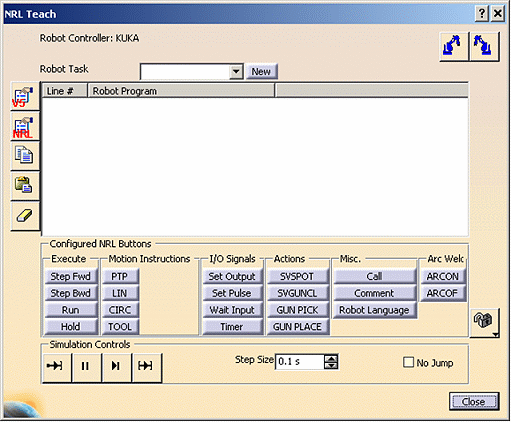
-
Select a motion instruction command (PTP, LIN, or CIRC), Jog the robot and Record positions. Click Play All to simulate the selected task.
-
Click Download Robot Program
 ,
in NRL Teach dialog box. The download operation will output Kuka Robot
Language (KRL) program files.
,
in NRL Teach dialog box. The download operation will output Kuka Robot
Language (KRL) program files.
For example:
;FOLD PTP P1 Vel= 50 % PDAT1 Tool[0] Base[0];%{PE}%R 5.1.2,%MKUKATPBASIS,%CMOVE,%VPTP,%P 1:PTP, 2:P1, 3:, 5:50, 7:PDAT1
$BWDSTART = FALSE
PDAT_ACT=PPDAT1
FDAT_ACT=FP1
BAS (#PTP_PARAMS, 50)
PTP XP1
; ENDFOLD -
Click Upload Robot Program
 ,
to upload the robot program stored in the previous step.
,
to upload the robot program stored in the previous step. -
Click Play All to simulate the selected task.
