
Controller Profiles
Every robot controller has certain profiles each of which define characteristics of different aspects of the controller. By default, controllers by the name Default are defined for Motion, Tool, Accuracy and Object Profile.
During uploading, controller profiles with the same values as the ones that already exist in a V5 process are not created again. If such profiles are used in the uploaded tasks, they are replaced by the existing ones.
Please see Device Task Definition: Workbench Description: Robot Controller Toolbar for more information on controller profiles.
Robot Parameter Data
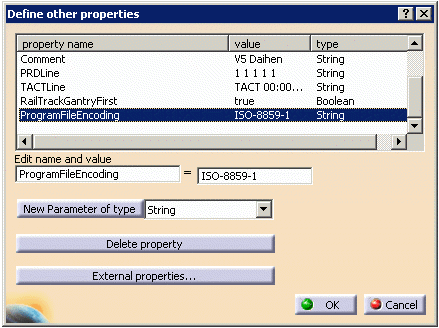
Robot parameter data informs the translator about the user's special requirements. See Robot Parameter Map section for supported parameters.
 |
The following procedure describes how to define device parameters. |
 |
Open the DaihenStart.CATProcess file. |
 |
|

Program Logic/IO
Input/Output signals are used to communicate between resources and synchronize multiple resource simulations.
Please see Workcell Sequencing: Workbench Description: IO Management Toolbar for more details.
Syntax Map
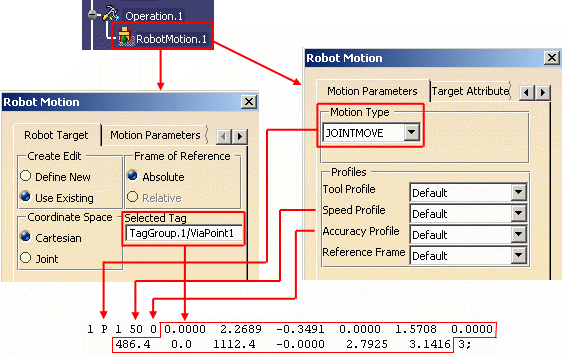
Please refer to the Robot Command Syntax Map worksheet in the DaihenV5xmlMap.xls file. The relationship between V5 robot motion, controller profiles and Daihen instructions is illustrated below:
Robot Parameter Map
Refer to the Parameter Data worksheet in the DaihenV5xmlMap.xls file.