-
The Rapid parser (Rapid.jar) will upload tag targets as non-via; All via tags in the original V5 task are uploaded as non-via tags.
The ABB robot language (RAPID) does not have an attribute to differentiate between via/non-via target types. This is a V5 convention. However, if the user uses an XML file for upload (instead of robot language file), the via/non-via target type information will be preserved in the uploaded task.
-
I am unable to download WELD action using RAPID translators.
If you are using the RAPID translator for download, make sure that the Spot Weld action is defined using RAPIDSpotWeld.act toolbars. Weld actions defined using other .act toolbars are ignored by the RAPID translator.
Commands that are not supported on upload in V5 OLP are mapped to pre and post activity attributes. Unsupported commands are mapped to as PreComment attributes to the succeeding activity/action. An unsupported command encountered at the end of the robot program will be mapped to a PostComment attribute to the preceding activity/action. Consider the following robot program where sequence 2, shiftrot 4 are unsupported commands in V5 OLP. Upon upload, these commands will be mapped to attributes as shown in the following scenario:
-
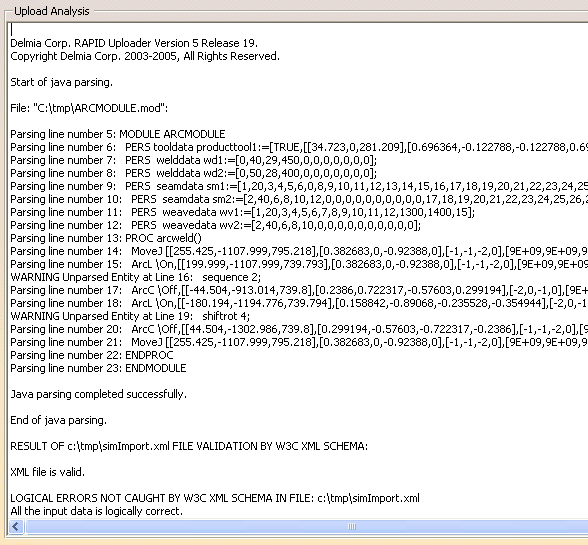
Upload a robot program with unsupported syntax. The parser reports the unparsed lines:
-
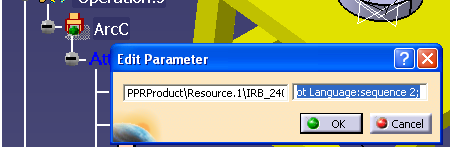
A RobotTask is created with unsupported statements mapped to PreComment and PostComment activity attributes:
-
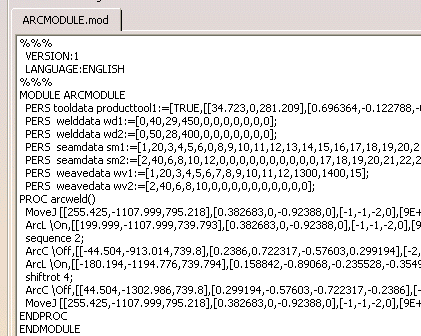
The download of this program must generate a robot program similar to the initial program that was uploaded:
-
-
The Rapid translator downloads the programs as a single module even though I did not select the Subroutines option in the Downloading Options dialog.
The Rapid translator always downloads tasks as procedures within a module. This is the proper format for ABB modules and procedures (tasks).
-
Whenever a robot task is downloaded, an XML file (simResult.xml) is generated behind the scenes. Which XML elements (in simResult.xml) are not used or supported by RAPID?
The following XML elements (in simResult.xml) are not used by RAPID during download:
OLPData -> Resource -> Controller -> ToolProfileList -> ToolProfile -> Mass
OLPData -> Resource -> Controller -> ToolProfileList -> ToolProfile -> Centroid
OLPData -> Resource -> Controller -> ToolProfileList -> ToolProfile -> InertiaOLPData -> Resource -> Controller -> MotionProfileList -> MotionProfile -> Accel
OLPData -> Resource -> Controller -> MotionProfileList -> MotionProfile -> AngularSpeedValue
OLPData -> Resource -> Controller -> MotionProfileList -> MotionProfile -> AngularAccelValue -
How does the Rapid translator and parser take into account the Object Frame profiles during download and upload?
-
If the object frame offset is zero and tool is mobile (mounted on robot), the frame of reference is the robot base frame:
The Rapid translator will read the target co-ordinate values from the simResult.xml file and output them into robtarget statements in the declaration section of the program with appropriate units regardless of whether Apply to all targets is set to ON or OFF. -
If the object frame offset is non-zero and tool is mobile, the frame of reference is the object frame (with its offset defined with respect to the world frame):
Rapid translator will read the target co-ordinate values from the simResult.xml file and output them into robtarget statements in the declaration section of the program with appropriate units regardless of whether Apply to all targets is set to ON or OFF. If the WorldCoords parameter (see parameter data section in Syntax Map xls sheet above) is set to 'false' then the Rapid translator will treat all object frame values as being with respect to the robot base and will recalculate target coordinates accordingly. -
If object frame offset is zero and tool is stationary (fixed TCP), the frame of reference is the robot's mount frame:
Rapid translator will read the target co-ordinate values from the simResult.xml file and output them into robtarget statements in the declaration section of the program with appropriate units regardless of whether Apply to all targets is set to ON or OFF. -
If object frame offset is non-zero and tool is stationary, the frame of reference is the object frame, which is defined relative to mount frame:
Same as fixed TCP case above.
-
-
Can I add comments to robot tasks in V5 and also download them?
To add/download comments:
-
Select the Operation/Activity/Action from the robot task.
-
Right-click and select Properties from the contextual menu.
-
Select Specific tab page.
-
Add the appropriate comments using the Attribute Type, Attribute Name and Attribute Value editors.
For Attribute Name, always use either PreComment or PostComment (depending upon the location of the operation). The comments will be downloaded by the Rapid translator. If the Attribute Name is not defined as either PostComment/PreComment, the translator will not see the attributes as being comments.
-
-
My robot task has an Activity/Action not yet supported byV5/OLP, but I still want to download the Activity/Action.
Please refer to the above FAQ. Follow the same procedure, except that the Attribute Value will be Robot Language:
<any robot language command>. For example, PAYLOAD[4] command in RAPID is not supported in V5. By specifying RobotLanguage : PAYLOAD[4] as Attribute Value, the transator will be able to download the above statement. -
The I/O activities in XML have an attribute by name Port Number, what does this correspond to in V5?
Port Number corresponds to IO Number in V5.