

- A resource with an attached tag group containing tag points to represent the simulation points that need to be adjusted
- A tag group containing tag points to represent the calibrated points that are uploaded from the measurements in the actual robotic setup.
For more information on the algorithm used for calibration, see About Least Squares Calibration.

-
Click Calibrate Workpiece
 .
. -
Select the resource whose position you wish to adjust.
-
Select the tag group attached to the selected resource that represents the simulation points that needs to be adjusted.
-
Select the calibration tag group corresponding to the uploaded information from the measurements in the actual robotic setup.
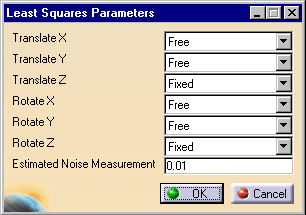
The following dialog box appears:
-
Alter the parameters as desired:
-
Translate X, Y, Z (i.e., set as Free/Fixed): specifies the directions in which the resource may be translated during adjustment.
-
Rotate X, Y, Z (i.e., set as Free/Fixed): specifies the directions in which the resource may be rotated during adjustment.
-
Estimated noise measurement: an estimate of the uncertainty of the positional measurements during the calibration experiment. The measurement noise need only be an order of magnitude estimate, for example 0.1 mm or 1.0 mm.
Unless the resource is known to be aligned with an axis or on a plane, the [X, Y, Z] parameters should all be set "Free" during calibration.
-
-
Click OK.
The least squares calibration results for the workpiece appear.
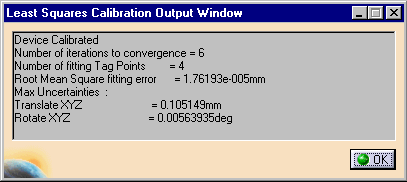
The table below describes the values provided:
Value Explanation Maximum uncertainties This value represents the maximum of the uncertainties for the fit on the parameters to be identified. Large uncertainty values are an indication that the experimental observation strategy was flawed, even if the RMS fitting error was small. Number of iterations to convergence The number of iterations required by the numerical identification method. Number of fitting tag points The number of points used for the least squares fitting procedure. Root mean square fitting error The root mean square fitting error on the points after adjusting the tool profile to the best fit possible. -
Click OK.
Based on the selections, the resource is moved in an attempt to get the first set of points to match up with the second set. The algorithm works by minimizing the mean square positional error between the corresponding points while maintaining the constraints of the Translate X, Y, Z and Rotate X, Y, Z selections.
