
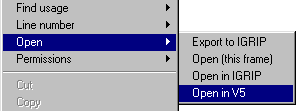
The context menu command Open> Open in V5 is included in Process Engineer for this purpose. This command allows the user to right-click on a selected process in Process Engineer and open that process in V5 DPM Process and Resource Definition.
The Load Parameters dialog box opens and you can choose whether to load the following inputs:
- Detailing
- BOM
- Open Mode
- Volume Criteria.
Requirements for Use
A VBS file, named DNBPPRHUBTOV5.vbs, is provided with the V5 installation in the directory ..\win_b64\code\command.
In addition, a Process Engineer administrator must customize Process Engineer to use this specific script when calling the Open in V5 command.
