
DPM Process and Resource Definition provides the ability to generate a stand-alone dataset (called a PackNGo dataset) from data stored in the PPR Hub. Once created and stored on the local filesystem, this dataset can be then be loaded by DPM applications without requiring a connection to the PPR Hub.

You must have a Process defined and stored in the Manufacturing Hub to create a PackNGo dataset.

Creating a dataset
1.
Launch DELMIA and load a PPR from the PPR Hub.
2.
Click PackNGo command
 in DPM Process and Resource Definition.
The Pack N Go dialog box appears.
in DPM Process and Resource Definition.
The Pack N Go dialog box appears.
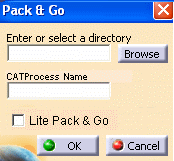
3.
You can also specify the pre-defined directory path for storing the pack and go dataset in Tools > Options > Digital Process for Manufacturing > Manufacturing Hub Advanced Option > Pack N Go Repository.
When you executes the Create Pack N Go data set command, Pack N Go dialog box is initialized with the path specified in Pack N Go Repository. You can change this path if different path is desired. Tools option path is used as preferred location for pack and go data set.
V5 session will remember the path specified during the execution of Create Pack N Go data set command. For the first run of the command path from tools option (Tools > Options > Digital Process for Manufacturing > Manufacturing Hub Advanced Option > Pack N Go Repository) will be used to initialize the Pack N Go dialog box, and for subsequent runs last used path from V5 session will be used to initialize the Pack N Go dialog box.
4.
A warning message is displayed if you specify some invalid name.
Select check box Lite Pack N Go to create
lighter pack and go dataset instead of full pack and dataset.
If this option is not selected then full pack and go dataset will be
created.
Upon clicking OK, all data relevant to the selected process is written to the
selected location.
The following documents are created for Lite Pack:
-
One *.CatProcess document
-
One *.act document
-
Log File
The following documents are created for Full Pack:
-
One *.CatProcess document
-
One *.act document
-
Pointed Documents
-
Log File
In case of normal PackNGo all pointed
documents of the CATProcess are saved in the specified location
and newly created CATProcess document will point to these copied
documents. During generation of PackNGo Lite data set, only
the CATProcess document and its associated CATIPDLibrary_XXX.act
file are saved. The pointed document data are not be saved. When
the PackNGo Lite CATProcess is opened, the pointed document
data is referenced from their original locations. Original
location is the location of the document data at the time the
PackNGo Lite dataset was created. This location can either be
File System or Engineering Hub (EH). In case of document data
residing in EH, the connection to EH needs to be ON when opening
the PackNGo Lite CATProcess, so that the math data can be
retrieved.
After generating a PackNGo dataset in V5 DPM, the new
CATProcess created in the PackNGo location is loaded in DPM
replacing the document loaded from the Manufacturing Hub. All
commands interacting with the Manufacturing Hub are disabled, as
the loaded CATProcess is not a Manufacturing Hub document.
