
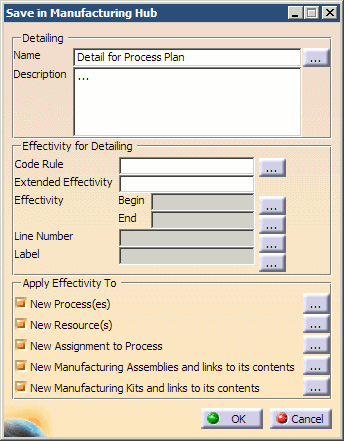
The Save in Manufacturing Hub dialog prompts you to enter filtering information that will be applied to the detailing data saved in Process Engineer. If detailing has been loaded, this dialog box is filled with the values of the currently loaded detailing.
Detailing
Clicking the
 button next to the Detailing Name
displays the Detailing Information dialog box and lists all detailing data that is linked to the current activity:
button next to the Detailing Name
displays the Detailing Information dialog box and lists all detailing data that is linked to the current activity:
|
|
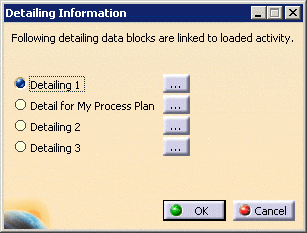
Clicking the
button next to a specific detailing
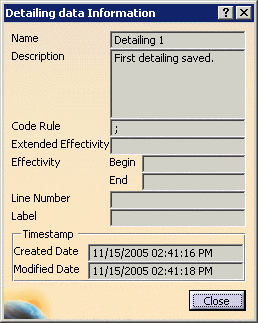
name displays the Detailing data Information dialog box. The values of the selected detailing are shown:
|
|
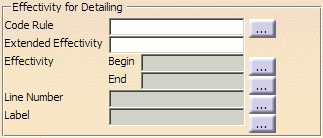
Effectivity for Detailing
Code Rules, Effectivity dates, Line numbers, and Labels can all be defined specifically for the detailing that is being saved.
 |
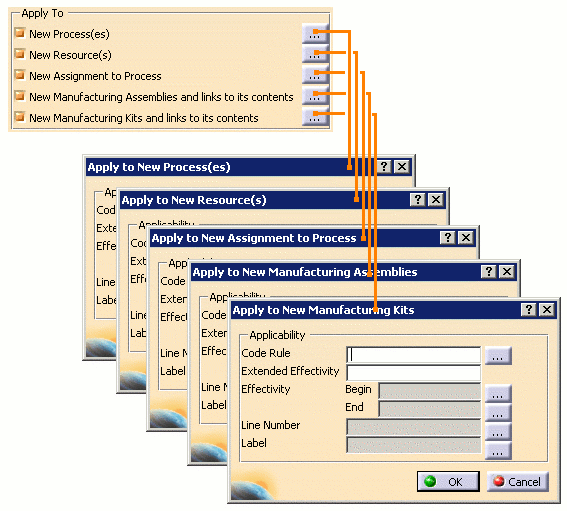
Apply Effectivity To
- Code Rules, Effectivity dates, Line numbers and Labels may all be
defined for each PPR object type by clicking the button
next to each topic.
-
The Apply Effectivity To section allows for the information defined in this dialog to be applied to:
- New Processes
- New Resources
- New Assignment to Process
- New Manufacturing Assemblies and links to their contents
-
New Manufacturing Kits and links to their contents
Reparenting and its Effect on Detailing
When a Manufacturing Hub process with detailing data is moved under a new parent with the Reparent Activity command in DPM, existing simulation data under the process is retained in the new location. For this reason, it is recommended that Reparent Activity is used when a process must be moved.
When a Manufacturing Hub Process with detailing data is moved under a new parent in DPM via other methods, such as drag-and-drop, cut-and-paste or copy-and-paste, the following occurs:
-
The original process and all of its children are deleted
- A new copy of the process and all of its children are created under the new parent
As the Process and all of its children are newly created, any simulation data under the children of the original process is not retained in the copied processes.
Notes
-
Detailing data (simulation activities such as Move, Viewpoint, etc.) created for a child process with a DELMIA V5 application is not visible when the parent process is subsequently opened in Process Engineer. This data can be retrieved only when the process that was used to create the simulation activities is reopened.
- Loading a detailing that has been saved on a resource that is
subsequently moved to or copied under a different parent in the
Manufacturing Hub database is supported. The new parent hierarchy of the
resource being reparented should be similar to the original hierarchy
(i.e., the number of parent levels and the plantypes of the parents must
be the same).
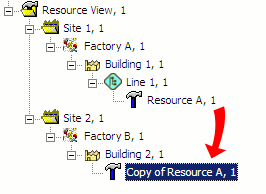
In the example above, if Resource A is a child of Line 1, and Resource A is copied and pasted to Building 2 in Process Engineer, the detailing for the copied resource will not be loaded in DPM. An error message indicating that the parent hierarchies are different will be displayed.
To support detailing objects that have been saved prior to R18 SP5, a script must be run in DELMIA Process Engineer. This script (Repair_PreR18SP5_Blobs) is available in R18 SP5 and higher releases, in the following location in the DELMIA installation: intel_a\VBScript\DPM_MHI.
Please refer to the DELMIA Process Engineer documentation regarding the creation and execution of Visual Basic (VB) scripts. Running this script on a project object in Process Engineer will repair all the detailing objects in that project. Running this script on any other object will repair all the detailing objects present in the database. - In prior DPM releases, saving detailing data could fail due to insufficient memory when the detailing data to
be saved was too large. To overcome this limitation and provide maximum reliability when saving, detailing data
is now saved to the database through multiple buffers. The default size of this buffer is 512KB, however a
different buffer size may be set via the PPRHUB_MBUF_SIZE environment variable. For example, to set a buffer size
of 64KB, set "PPRHUB_MBUF_SIZE = 65536" (where 64KB = 64*1024, or 65536 bytes).
Using a larger buffer size can result in fewer interactions with the server when saving the detailing data. However, setting a value that is too high may cause the save to fail if a buffer of the specified size is not available in system memory. - Detailing may also be saved in a single buffer by setting the environment variable PPRHUB_MBUF_SAVE to FALSE. When PPRHUB_MBUF_SAVE set to FALSE, the environment variable PPRHUB_MBUF_SIZE is ignored.
