 |
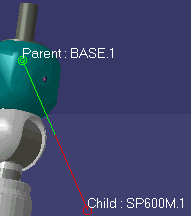
When an attachment is created, you see data to that
effect on the geometry. |
|
 |
|
You can choose to clear this data from the geometry.
You can either select a specific attachment and suppress its
representation, or you can select products and suppress all representations
of attachments for that product. |
|
In each case, select the object
(the attachment or product), then
click
Hide Attachments  . . |
|
To see the representations of
attachments on the geometry, select
the product and then click
Show
Attachments  . . |