
This command enables users to evaluate Functional Dimensioning and Tolerancing data during the process.
The OUTPUT command allows the continuation of the association of the tolerances to the features from the CMM to the downstream applications. This command performs the evaluation of one or two features to one or more tolerances. In addition, it sends this information (nominals, actuals, deviations, etc) to any and all peripheral output devices that are enabled at the time the command is executed. These devices could be a display terminal, a printer, a communications port, a CMM-style (vendor format) data file, which is in turn grabbed (or sent, depending on the initiater) to a database for later analysis (SPC, root cause, in-process audits, etc). Optionally, a pre-defined report (using the REPORT command) can be associated to the OUTPUT command so that the CMM can send additional information regarding the process data.


-
Select the process on the PPR tree.
-
Click OUTPUT Results
 .
.The Output Statements dialog box appears. 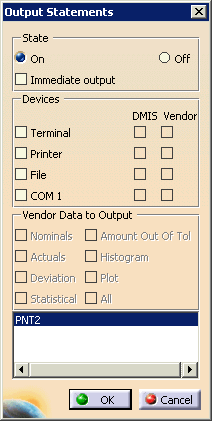
Select the options you want. - Select On or Off:
- If you select On, the data will be accessible via the node on the PPR tree.
- If you select Off, you will end output statements at this point in the process.
- If you select Immediate output, you can see the data on the devices selected below. Otherwise, you will see the output in the Output node on the PPR tree, once the data has been collected.
- The devices you can select are peripheral output devices enabled at the time the command is executed.
- If you select Vendor with any of the devices, you can select the vendor data you want output to the device.
The box is accessible whenever you select the Output node on the PPR tree. You can alter the options when necessary. - Select On or Off:
