
The mirrored activities can be added at the end of the existing process or mirrored into a group, in which case they appear after the first of the selected mirrored activities.


-
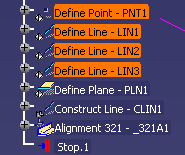
Using the CTRL key, select the activities you want to mirror.
-
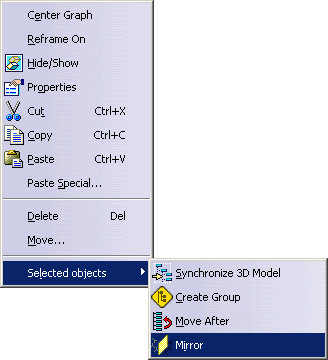
Using the right mouse button, select the Selected objects>Mirror from the context menu.
The Mirror dialog box below allows you define the axis of mirroring, the activities to be mirrored, and the output of the mirroring. 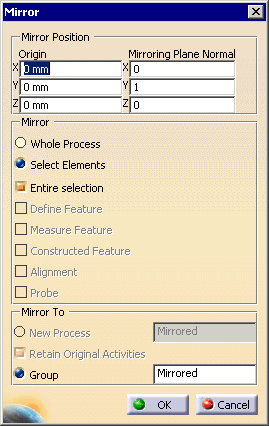
Origin and Mirroring Plane Normal coordinates determine the location of the activities that will be created as a result of the mirroring, and where those activities will be relative to the selected ones. If an entire process is mirrored, then the process occurs in a space relative to original one, as defined by the Mirror Position coordinates. When you select the activities (or a process) to be mirrored, and the dialog box appears, the compass moves to the data. You can alter the Mirror Position coordinates by moving the compass on the geometry. In addition, you can use the RMB to select the compass, and then select Edit from the context menu. This enables you to edit the compass parameters. If you select Whole Process in the Mirror portion of the dialog box, then you can choose to mirror to a new process. The new process will open a new window. If, in the Mirror To section, you select Group, the mirrored activities appear at the end of the existing process. If you select Retain Original Activities, they remain (the default); otherwise, they are deleted. -
Select the OK button when the correct parameters have been entered on the dialog box.
The mirrored group or activities appears in the PPR tree; a mirrored process appears in its own, new window.
