 |
This procedure describes how to create an inspection
station operation activity. These activities are the top nodes
immediately beneath the process node; all other inspection activities are
children of one of the operation activities. Each operation
corresponds to a type of dimensional measuring equipment (DME). The
available operations are:
- Create Single-Arm CMM Station

- Create Dual-Arm CMM Station

|
 |
The resource requirements for each station are:
| |
DME |
Probe head |
Tool Assembly |
Stylus Tip |
Snapped-attached? |
| Single-Arm CMM |
yes |
yes |
yes |
|
probe head + CMM;
tool assembly + probe head |
| Dual-Arm CMM |
yes |
yes |
yes |
|
probe head + CMM;
tool assembly + probe head |
|
 |
-
Select the Process node.
-
Click Create Single-Arm CMM Station.
 |
If only one single-arm CMM is loaded into the Resource list,
skip one step; the loaded single-arm CMM is
assumed to be the CMM. |
-
Select a CMM from the Resource node.
|
|
If only one single-arm probe head is loaded into the Resource
list, skip to the next step; the loaded
probe head is assumed to be the probe head. |
-
Select a probe head from the Resource node.
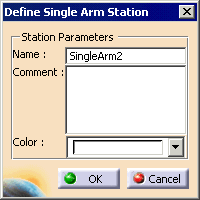
| The Define Single Arm Operation dialog box appears. |
 |
-
In the Name field, accept the default name,
or enter a new one.
-
In the Color field, accept the default, or
select a new one.
|
|
On the PPR tree, the color selected marks all the activities
that are children of the operation activity. |
-
Click OK.
|
|
|
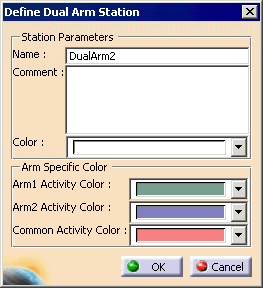
If you select Create Dual-Arm CMM Station,
the dialog box options appear below. In addition to controlling the
color of activities of the operation, common and and arm-specific
activities can have unique colors. The resources are not selected when
you create a Dual Arm Operation; you select the resources when you create
the Arm 1 and Arm 2 activities. |
| |
 |
| |
If an activity is present under a particular operation
activity, all its dependent activities must also be present under the
same operation. For example, if Define Point1 activity is present under a
particular operation, the corresponding Measure Point1 activity and all
the construct feature activities dependent on Define Point1 have to be
present under the same operation. Also, all activities dependent on those
constructed features must also be present under the same operation. |
