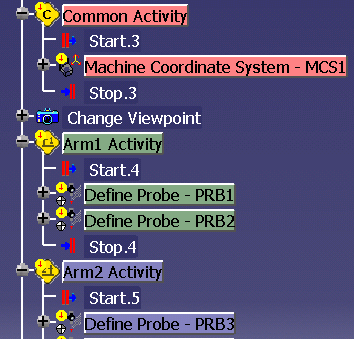
Creating a Common Activity

This procedure describes how to create a Common Activity.
You must create both an Arm1 and Arm2 Activity before you can create any simultaneous, common, or synchronous activities.  The insertion point for the common activity can occur before the Arm1 or Arm2 Activity.

Define MCS should be a Common Activity.

  1. Select the insertion point in the process.

  2. Click Common Activity.

    On the PPR tree, the Common activity appears in the color you selected for Common when you created an operation activity.   All activities that you subsequently add to the PPR tree as children of the Common Activity also appear in that color.
    The following activities cannot be added to a common activity:
     
    • Define Probe
    • Activate Probe
    • Define Toolchanger
    • GOTO points
    • PTMEAS (hitpoints)
    • Measure Feature
    • 3-2-1 Alignment
      If you subsequently create a simultaneous or synchronous activity, a Common activity is automatically created as the child of those activities (along with Arm1 and Arm2 activities).