Measuring Multiple Features  

This procedure describes how to measure any or multiple features.  If you are willing to accept the default measurement path and get defined features from other sources, this can save a great deal of time.
To measure any or multiple features, you must have a product loaded and features defined.
  1. Select the preceding activity for the measure activity. 

  2. On the Inspection Activities toolbar, click Measure Features.

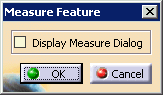
    The Measure Feature dialog box appears.
  3. To see the measure dialog for the feature you will be selecting, check the Display Measure Dialog box.  Otherwise, select a defined or constructed inspect feature.

    The MPath appears on the geometry.
  4. Continue selecting inspect features until you have the MPath you want, then select the OK button.