|
Multiple Resource
Simulation
 enables users to select tasks associated with more
than one resource (e.g., multiple robots or multiple manikins) and
simulate those tasks simultaneously, even though the tasks run
sequentially in the process document. enables users to select tasks associated with more
than one resource (e.g., multiple robots or multiple manikins) and
simulate those tasks simultaneously, even though the tasks run
sequentially in the process document. |
Multiple Resource
Simulation
serves as a lead-in to Process Simulation  . . |
|
| Once you invoke the Multiple Resource
Simulation
, you get the
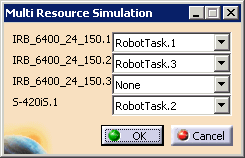
Multi Resource Simulation
dialog box. |
|
|
|
|
| The dialog box lists all the
resources in the PPR tree that have tasks associated with them.
Use the list to select the tasks you want to see run
simultaneously. (Remember that None is an option for
the list associated with each resource.) Once you select the tasks and click OK, you see the toolbars associated with Process Simulation
. |
|
| See Running the Process Simulation for more information. |