
You can listen to a chosen publisher of viewpoints in order
to receive that person's viewpoint.

-
Click the Viewpoint and Highlight sharing
 button.
The Viewpoint and Highlight Sharing
dialog box appears.
button.
The Viewpoint and Highlight Sharing
dialog box appears.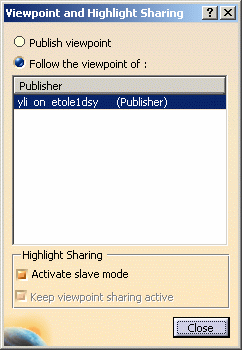
-
Click the Follow the viewpoint of radio button.
-
In the Participants list, click the identifier of the publisher to whom you will listen.
-
To synchronize with the document highlights of the publisher's viewpoint, click the Activate slave mode checkbox.
Note: the listener in Slave Mode cannot add highlights and that the Product List in the listener's viewer will not be available.
-
Click OK to confirm.
You are now a listener to published viewpoints.
You will now see the viewpoint published by selected publisher. Any modifications that person makes to his viewpoint will be immediately visible on your screen.
Note: If the publisher makes any changes (Graphic Properties, Measuring, Sectioning, etc.) to the assembly during the meeting, the listener will not be able to see them. Only the viewpoint is shared with the other users.
