
You can invite other people to join your two-way chat
meeting.

-
From an opened Chat dialog box, click the Invite others button.
A dialog box appears. -
In the User Name text-entry field of the Add Invitees area, enter a string to identify the user you wish to invite to the chat and press the Add>> button.
The string will be used to search the company directory.
If the string is contained in one name only, that name is added to the list of invitees.
If the string is contained in multiple names, a list of the names is presented and you must press the Add>> button associated to each name to add that user to the invitees list.
If no name is found containing the string, a warning box appears informing you that there was no match found in the company directory.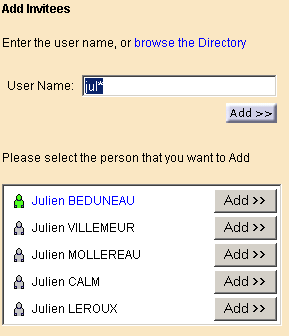
-
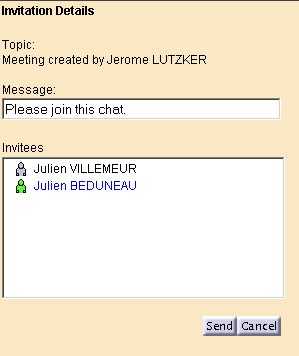
Repeat step 2 until your list contains all of the users you wish to invite to the chat.
-
If you wish to modify the invitation message that will be sent to each invitee, enter the new message in the Message text-entry field.
-
Press the Send button to send the invitations to the invitees.

You can also search for users in your company directory be clicking the browse the Directory hyperlink.
