 |
In addition to manikin postures, manikin attributes can
now be saved within catalogs. These attributes include:
- posture and position
- anthropometry
- vision
- display
- referential
- angular limitations
- preferred angles
- offsets
- reports
|
| |
These manikin attributes are
selected directly from the PPR tree.
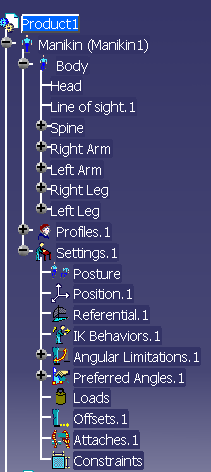 |
|
|
This will
include angular limitations properties, Appearance properties, offsets
and reports. This data will be modeled and saved within the existing
CATSwl files, to which the catalog elements will point, as it is the case
for other manikin data that can be reused.
This also will enhance the performance when reusing data for multiple
manikins, as well as when applying modification on manikin in different
scenarios.
This gives the user the possibility to:
- Save one or many offsets in a catalog by selecting the offset
node directly in the PPR tree or by selecting the parent node.
- Save one or many reports (the settings and not the data) in a
catalog by selecting the report node directly in the PPR tree or by
selecting the parent node.
- Save the angular limitations properties of the manikin's
segments including the locked joints and free joints in a catalog.
- Save the appearance properties of the manikin.
- Load offsets properties from a R14 or R15 catalog.
- Load offsets from a R16 catalog.
- Load reports from a R16 catalog.
- Load lock properties from a R14 catalog.
- Load angular limitations properties without Locks from a R14 or
R15 catalog and with Locks from R16 catalog.
- Load appearance properties from a R16 catalog.
|
Save mechanism
-
Select in
the tree the attributes of the manikin to be saved, and click on
Save in the panel.
-
Reports: It will be possible to save it in
catalog by selecting the Report of your choice or by selecting
the node Reports, which will save all the reports of this
manikin.
-
Appearance: It will be possible to save
all the color of the manikins segments, hair, eyes and lips in a
catalog by selecting the node Appearance.
-
Angular limitations/ Locks: You will
be able to save the Angular Limitations of the manikin, which
also include the locks. The Angular Limitations including
the locks of specific segments can still be saved.
-
Offsets: Select the offsets node
(save all the offsets of the manikin) or the offset itself to
save in catalog.
|
|
 |
|
|
|
-
To save manikin attributes directly into a catalog,
select the Save manikin's attributes in catalog
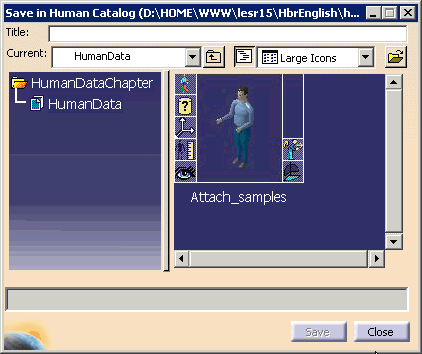
 The catalog browser is displayed.
-
Open the catalog in which the attributes will be
stored. Note that all saved attributes are displayed as icons for each
catalog entry and correspond to the manikin attributes displayed for
each manikin in the specification tree.
-
Attributes that can be saved are:
| Profiles |
|
|
|
Display |
|
|
Coloring |
| Settings |
|
|
Referential |
|
|
IK Behaviors |
|
|
Locks |
|
|
Loads |
|
|
Offsets |
|
|
Attaches |
|
|
Constraints |
-
From the PPR tree, select the
attributes to be saved.
-
Enter a title for the manikin attributes that are about
to be saved. Select OK. The catalog browser is updated,
displaying the new posture/set of attributes that have been saved.
|
 |
The Products and Resources Catalog Browser
command
 ,
originally found in the Insert menu, has been removed. ,
originally found in the Insert menu, has been removed.
A manikin must be regarded as a unique entity. Importing the
same manikin more than once in an environment (through the use of a
catalog) creates referencing problems, for instance, the two (or several)
manikin instances cannot have different postures or different
anthropometries, although they may have different positions when saved.
We do not advise the use of catalogs to save and reuse the
manikin as a whole. However, we do advise catalogs of manikin
properties (posture catalogs, for example), as those kinds of
catalogs do not generate instance/reference problems. |
|
|
It is no longer possible to open .swl library files.
Existing libraries are automatically
converted into catalog files. |
