 |
You can define the appropriate
lock policy that is applied when an instance is added, moved, replaced
or deleted under an assembly parent. This task shows you how to add,
move, replace, delete a
Part instance under a Product without first having to lock
the parent. |
 |
-
Using the VPMSettings tool, change the
VPMAdmin.CATSetting file and set the declaration parameter
CV5EV5_PARENT_LOCK_REQUIRED to:
-
ReferenceAndInstance - When used, both
instance and reference of the parent must be locked by current user
for add, move (parent reference lock only), replace or delete of a
child instance. This is the same as the default behavior when
no parameter is set.
-
ReferenceOnly - When used, only the parent
reference must be locked for add, move, replace, or delete of a
child.
-
None - When used, neither instance nor
reference of the parent has to be locked for add, move or replace.
However, for delete, lock on the parent reference will still be required.
Example:
VPMSettings --f
		VPMAdmin --a
		--n
		CV5EV5_PARENT_LOCK_REQUIRED -v [ReferenceAndInstance]
or
		VPMSettings --f
       VPMAdmin --a
		--n
       CV5EV5_PARENT_LOCK_REQUIRED -v [ReferenceOnly]
or
		VPMSettings --f
       VPMAdmin --a
		--n
       CV5EV5_PARENT_LOCK_REQUIRED -v [None]
-
Add, move, replace, or delete instance (a Part, a component or a
Product) under the unlocked parent product, or under the product locked
by other user, either by means of insertion
or copy-paste.
-
Save the instance in the ENOVIA database.
Depending on the specified conditions of the variable and the lock
status, the save is performed. If save is unsuccessful, error message is
displayed indicating the cause of the failure.
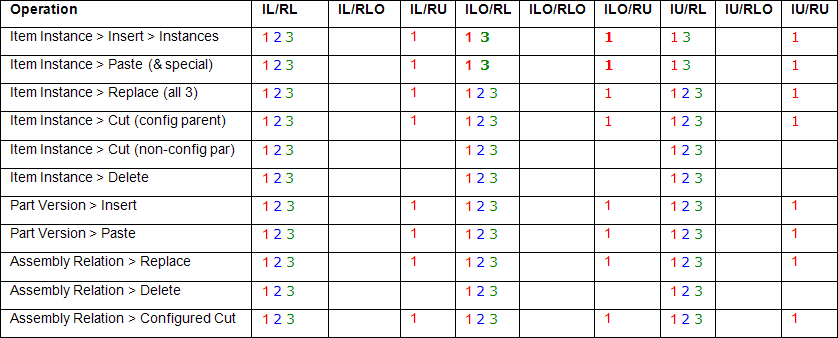
Please refer to the following matrix which describes the
menu items enabled (x) for the 3 values of CV5EV5_PARENT_LOCK_REQUIRED
and various combinations of parent lock. IL = Instance
Locked by User RL = Reference
Locked by User
ILO = Instance Locked by Other RLO = Reference Locked
by Other
IU = Instance Unlocked
RU = Reference Unlocked

In Product and Part Editors, you can Add, Replace, Cut, and Delete a
descendent instance when the parent instance is locked by another user.
By default, the lock on parent instance is ignored.
 |
 Saving Child Components Without Locking the Parent
