


-
Click 3D Axis
 in the Tools toolbar.
-
Select a point.
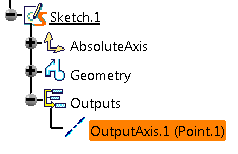
An axis is created on the selected point. The
created output axis appears under the Outputs node in the
Tree.
You can exit the Sketcher workbench to view the created axis.

- Alternatively, you can right-click the point in the Tree and select Point.x object > 3D Axis to create the 3D axis instantly.
-
Optional: Change the reference element for the 3D axis.
- Click OutputAxis.y (Point.x) that is
displayed under the Outputs node in the Tree.
The Output Axis Definition dialog box appears.
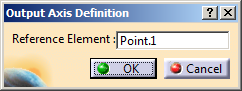
- Select a different point.
The name of the selected point appears in the Reference Element box and the 3D axis is created on the newly selected point.
- Click OutputAxis.y (Point.x) that is
displayed under the Outputs node in the Tree.
-
You can select the point in the 3D area and press DELETE to delete the axis. Alternatively, you can right click the point node displayed in the Tree and select Delete.
