
-

-
- Starts the color editor,
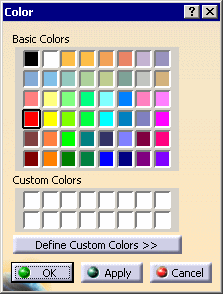
- Indicates the current color.
- Starts the color editor,
-
 Takes into account the color of the first selected face
 - Restricts the propagation to the faces that have the same color as the first selected face.
-
 Propagates on belt of faces
 - Selects all the faces that are adjacent to the face you have selected, and that form a strip.
- Select one face, then an adjacent one (to give the direction) and
click
.
-
Propagates on faces until a face
- Selects all faces that are adjacent, between start and stop faces.
- Select one face, then an adjacent one (to give the
direction) and click
.
- Select a third face where you want to end the selection.
- Select one face, then an adjacent one (to give the
direction) and click
-
 Propagates on faces
 - Select all faces that are adjacent to the face you have selected.
Select a face and click.
-
 Selects faces in a polygon trap
 - Selects all faces that are entirely within a polygon trap.
- Click
.
- Draw a polygon.
- Double-click to end selection.
- Click
-
 Select visible faces in a polygon trap
 - Selects all faces that are entirely within a polygon trap and that
are visible.
- Click
.
- Draw a polygon.
- Double-click to end selection.
- Click
-
 Selects normal or(and) parallel faces
 -
Selects faces that are: - normal to a main axis,
- parallel or perpendicular to a reference face.
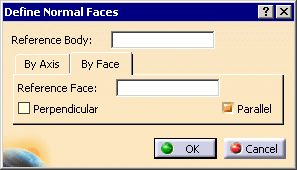
The Define Normal Faces dialog box is displayed:
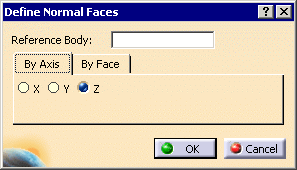
The By Axis tab lets you select all the flat faces normal to a main axis of the current axis system.
- Select the Reference Body,
- Choose an axis and click OK.
The By Face tab lets you select flat faces with reference to the face you have picked.
- Select the Reference Body and a Reference Face,
- Choose Perpendicular and/or Parallel and click OK.
- The Reference Body is populated by default if you select a face before entering the dialog box.
-
 Retrieves faces of same color
 - Selects all the faces of a given color.
Select a face of a given color and click.
-
 Creates Selection set
 - Creates a selection set from the selected faces of the current color.
-
 Loads Selection set
 - Selects the faces belonging to a previously created selection set.
-
 Undo
Undo - Undoes last action.
-
 Reset all selections
 - Resets all selections.
-

- Colors the selected faces.