
This page describes how to set the Order Create options of DPM Shop Order Release.
Xml Schema Filters
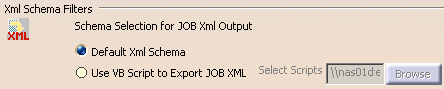
The Create Job XML command is used to generate XML output for the current CATProcess. The output may conform to either:
-
the Default Xml Schema
-
or you can Use VB Script to Export JOB XML
If you select the latter option, the Browse button is enabled; use it to select the VB script.
 By default, Default Xml Schema is selected.
Customize Order Create Settings
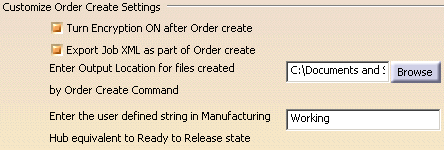
Turn Encryption ON after Order Create
Enabling this option turns on encryption mode when using the Order Create Multiple JOBs command, or when creating work packages from a third-party MES client.
By default, this option is enabled.
Export Job XML as part of Order Create
Enabling this option exports the JOB XML when using the Order Create Multiple JOBs command, or when creating work packages from a third-party MES client.
By default, this option is enabled.
Enter Output Location for files Created by Order Create Command
Specifies the destination folder for files created by the Order Create Multiple JOBs command. Note that the Windows operating system has an absolute limit of 260 characters for a file name; the file name includes the full path.
By
default, this directory is set to: C:\Documents and Settings\user_name\Local
Settings\Application Data\DassaultSystemes\CATTemp.
Enter the user defined string in Manufacturing Hub equivalent to Ready to Release state
The Manufacturing Hub allows you to define a string that is equivalent to the Ready to Release state. Enter that string in this box.
By
default, the string is specified as Working.
