 |
| This page deals with the options concerning:
|
|
|
 |
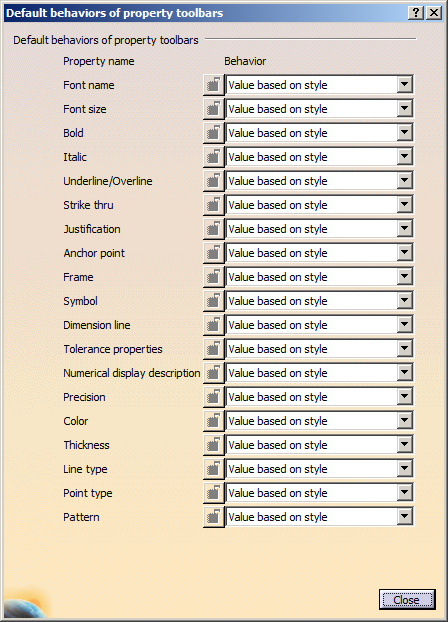
Defines the default behaviors of the items in the property toolbars.
To do so, click the Configure... button and in the
Default behaviors of property toolbars dialog box configure the
behavior of the default value of an item in the property toolbars. The four
families of property toolbars that support this are:
- Text Properties toolbar
- Dimension Properties toolbar
- Numerical
Properties toolbar
- Graphical Properties toolbar
|
The above properties can have the following configurations for
default value:
- Fix value: The default value is fixed
irrespective of the current style in the style toolbar, except
when an element is being created or is selected. On changing the
current style, the properties with fixed value remain unchanged.
 |
- The following properties do not have a fix value
configuration:
-
Frame
-
Symbol
-
Dimension line
-
Numerical display description
|
-
When the behavior of a property is set to Fix value,
the default values are not stored on closing the session.
-
When the behavior of a property is set to Fix value, the default
values are applied for all objects supporting the considered property.
The graphic properties toolbar has more preference than the standard style
and impacts several features.
|
-
Value based on element type: The default value is
stored by element type when the current style is changed in the Style
toolbar, unless some elements are being created or are selected.
The stored property values are restored each time a style of the same
element type is set as current in the Style toolbar.
|
|
-
When the behavior of a property is set to Value based on element
type, the default values are not stored on closing the session.
-
When switching to another element type, last overloaded values
(default values) of this element type are restored to properties in such
mode.
-
The Pattern property does not have the Value based on element
type mode.
|
-
Value based on style: The property values are reset
to style values each time a style corresponding to a new element type is set
in the Style toolbar, unless some elements are being created or are
selected. That is, each time a style is changed in the Style toolbar, the
property default value is changed to fit the style property value.
|
|
-
For Value based on style mode, default values are automatically
initialized to style values.
- You can overload the default value
before creation of an element. In this case, after
creating the element, if you clear all selection,
default value is restored.
|
- Value based on style (No overload): The property
values are reset to style values each time a style corresponding
to a new element type is set in the Style toolbar. They cannot
be modified unless some elements are being created or are
selected.
|
|
-
For Value based on style (No overload) mode, default values are
automatically initialized to style values.
- You cannot overload the default
value before creation of an element.
|
The Tolerance Description and Tolerance properties are mutually
dependant. Updating one updates the other too.
For documents created with standards used before V5-R11, the
styles are not applicable. For such documents, the Value based
on element type or Value based on style behave like Fix value.
 By
default, the behavior of each property is Value based on
style. By
default, the behavior of each property is Value based on
style.
|
|
|
|
| Defines the naming uniqueness. |
Ensure uniqueness of view names
|
| Select this check box to ensure the uniqueness of view
names during creation or renaming. |
|
By default, this check box is cleared. |
Ensure uniqueness of capture names
|
Select this check box to check during creation or renaming, the uniqueness
of capture names.
By default, this check box is cleared. |
Distinguish SBCS and DBCS characters
|
Select this check box to distinguish capture or view names
in single byte character set (SBCS) and double byte character set (DBCS)
formats during creation or renaming.
This means “View.1” written in SBCS format is different from “V i e w . 1”
written in DBCS format. |
This check box is available for selection only when
Ensure uniqueness of view names,
Ensure uniqueness of capture names, or both are selected.
By
default, this check box is cleared. |
Distinguish lower case and upper case
|
Select this check box to distinguish capture names or view
names in lowercase and uppercase during creation or renaming.
This means “View.1” is distinguished from “view.1”. |
This check box is available for selection only when
Ensure uniqueness of view names,
Ensure uniqueness of capture names, or both are selected.
By
default, this check box is cleared.
|